Category: Uncategorized

  • Your Guide to Buying Blog Posts Online

    Your Guide to Buying Blog Posts Online

    Valuable content, especially blog posts, is quite a rarity. Not only are they difficult to draft, but their over-saturation in the digital space has led many to venture out. After all, blog posts have to be able to drum up substantial brand awareness. Buying blog posts online can certainly help, especially if you want to churn out a good number of blogs for SEO purposes. Buying blogs online is a smart solution for the same. So sit tight and let us guide you in your journey toward buying high-quality articles online.

    Significance of High-Quality Blog Articles

    Any article that adds value to the reader’s knowledge about a particular niche can be termed a high-quality blog article. Your content should be specifically catered to the audience you are targeting. Also, the content should be rich in keywords and should be well-researched.

    A high-quality blog boosts brand awareness, boosts product page rankings, and boosts website organic traffic, thereby strengthening search rankings.

    If you wish to engage your customers through your expertise in the domain you cater to, then high-quality blog content is your magic wand.

    Why Should You Buy Blog Posts Online?

    Blogs cover a wide range of subjects that excite different users who are fond of reading content online. You can effortlessly find the specific information you are looking for or gain more knowledge about a particular subject by reading quality blog content.

    Consumers are on the lookout for content that offers value they can easily apply to their everyday routines. Whether it’s solving problems or just providing a bit of entertainment, meeting these needs is key

    An impactful blog post requires striking the right balance in your tone to create a connection with your readers. Sometimes, despite having good ideas, you are unable to implement them into a well-structured blog post. 

    Crafting a well-thought-out blog post requires a great deal of time and effort, which is challenging in this fast-moving world. Buying quality blog posts online can be an effective solution to this.

    Buying blog posts online saves you time and effort, allowing you to concentrate on other parts of your business. It also increases web traffic and your brand’s conversions.

    How Should You Choose a Blog Post Service Online?

    Almost every business aspires to grab the eyeballs of the audience it caters to. Identifying industry trends and conducting thorough market research is an effective way to engage your audience. 

    Also, take a look at what your competitors are up to – see how they’re making their content more impactful. But the real trick? Just make sure your content speaks to your readers in a way that sticks.

    Finding an exemplary blog post service is vital for determining the web traffic you would get to your website and your business revenue, as it directly impacts your sales and conversions.

    Several factors should be considered while finding the right service for your blog content.

    The content writing firm should understand your target audience well. The firm must have sound SEO knowledge. Most importantly, their past samples should be impactful enough to attract the right target audience.

    Always research and compare different blog post services based on their expertise in the niche you belong to. To determine whether the business you select has a past track record of success, make sure to read reviews and testimonials.

    All these steps will help you find the right blog post service that aligns with your business needs and helps you achieve organic growth.

    What Factors Should You Consider While Buying Blog Posts Online?

    Finding the right service while buying blog posts online is significant. The firm or the service you hire should understand the aim of your marketing campaigns.

    A few factors must be considered before finding your brand’s right blog post service. The three major ones are given below.

    Industry Expertise 

    • A professional content writing firm will always research your brand demographics.
    • They would always take some time to understand your consumers before accepting the content writing work assigned by your brand.
    • Ample research should be carried out even before writing the content piece. The content writing service should understand what your audience is searching online and what content they expect.
    • Tools like Ahrefs, Semrush, and Google Trends are some of the tools such content marketing firms use.

    Quality Assurance

    • Quality Assurance involves many steps like proofreading, editing, AI detection, plagiarism checks, and so on. 
    • Proper credibility must be depicted in the content by citing relevant sources. The content piece should have a Grammarly score of 99 and above, while the readability score should be above 50.
    • The content should be thoroughly checked for AI content and plagiarism using premium tools. A responsible blog writing service would always offer a guarantee to the businesses that believe in them.
    • A money-back guarantee can be an effective measure in making the companies believe in such services. It shows how confident they are about the content they produce for your business firm.

    SEO Optimization

    SEO helps improve your search engine rankings to a greater extent. Organic search results play a significant role in making the site accessible to visitors if optimized correctly.

    Besides increasing your website traffic, SEO contributes to a better user experience. Even people with disabilities can easily access your website if its content is modified correctly per the SEO guidelines.

    Source

    Nowadays, blog writing services take all the necessary measures to ensure your content is optimized as per the SEO guidelines. Some of the major things they keep a tab on are listed below.

    • They optimize your content for featured snippets.
    • They look for keywords in meta descriptions and titles.
    • They add relevant alt texts to your images.
    • They check for keyword stuffing.

    Tips for Choosing a Reputable Blog Post Service

    Although, hiring a blog writing service might help you save both time and money. But a few things mentioned below should be kept in mind.

    1. Avoid hiring more than one blog post service.
    2. Working with a single content provider helps you maintain a positive long-term relationship.
    3. The blog writing firm should understand your brand tone and voice. 
    4. Price should not be the sole factor for considering one blog post service over another.
    5. Ask for a sample content piece to see if they can deliver content as per your expectations.
    6. Do not forget to get a quote as it helps you understand the services the firm offers in detail and whether their services fit your budget.

    Which Firm Can You Best Consider for Buying Blog Posts Online?

    Purchasing an existing blog post is cost-effective and has built-in authority. It can save you both time and money, resulting in better productivity.

    You can hire the below-listed blog post services for your day-to-day content requirements.

    1. Wittypen

    Wittypen offers high-quality content that can be a game changer for your business. It offers economical, and pocket-friendly content services for your brand. Here’s why you should consider Wittypen for your blog posts:

    • Around 525+ prestigious firms are registered on Wittypen.
    • Wittypen has delivered 72,205+ content pieces so far.
    • A pool of 1,735+ writers is a part of Wittypen.

    Wittypen has a vast pool of talented writers from diverse locations who are just a click away from offering you the best content writing services. Contact Wittypen today for your first content order!

    2. Express Writers

    They offer content writing services, including blog writing. They mainly operate at four levels, and there is a difference in the prices for each level. The writers at Express Writers offer well-written SEO-friendly content that will help you achieve organic growth.

    3. Writer Access

    Writer Access offers a platform where you can connect with freelance writers and designers, as well as access various AI tools to optimize your content. 

    You can either submit your writing requirements or search for the most apt writers to write for you. This platform is right for you if you want to manage the whole content writing ecosystem in collaboration with the writer.

    How to Maximize the Value of Your Purchased Blog Posts 

    In this era of digital expansion, owning a high-quality blog post can surely act as a boon for you. But, only purchasing a blog post is not enough; you need to employ certain top-notch strategies. 

    The below-listed steps will surely guide you on how to increase the worth of your purchased blog post and utilize it to the optimum limit.

    1. You should be sure of your audience preferences, be it short or long-form articles, newsletters, or whatever.
    2. It would help if you looked for content gaps, which will surely help you measure your content.
    3. You should measure the reach, engagement metrics, content downloads, and other important KPIs that help keep track of business value.
    4. You can start by performing an audit of how the blog post has performed so far.
    5. Resharing the blog post on different social media channels can help it reach a wider audience.
    6.  You can also restructure its content in a different form.
    7. For instance, you can convert the blog post into an infographic or short social media posts with captions if that works.

  • Top-Rated 10 On-Page SEO Tools for Enhanced Search Visibility

    Top-Rated 10 On-Page SEO Tools for Enhanced Search Visibility

    Introduction

    On-page SEO tools are magic wands that transform your website content into high-ranking pages on Google. These tools optimize your website’s internal elements, like content, keywords, meta tags, URLs, and site speed, to maximize organic viewership.

    The best on page analysis tools not only fine-tune your website for search engines but also for humans. They create a seamless user experience for your target audience, ensuring not just visitors but real engagement and conversions. Here are the best on page SEO tools that can give your website the traction it deserves!

    Best 10 On-Page SEO Tools for #1 Position on SERP

    Wittypen on-page SEO tool

    Source

    1. Wittypen: On Page SEO Checker

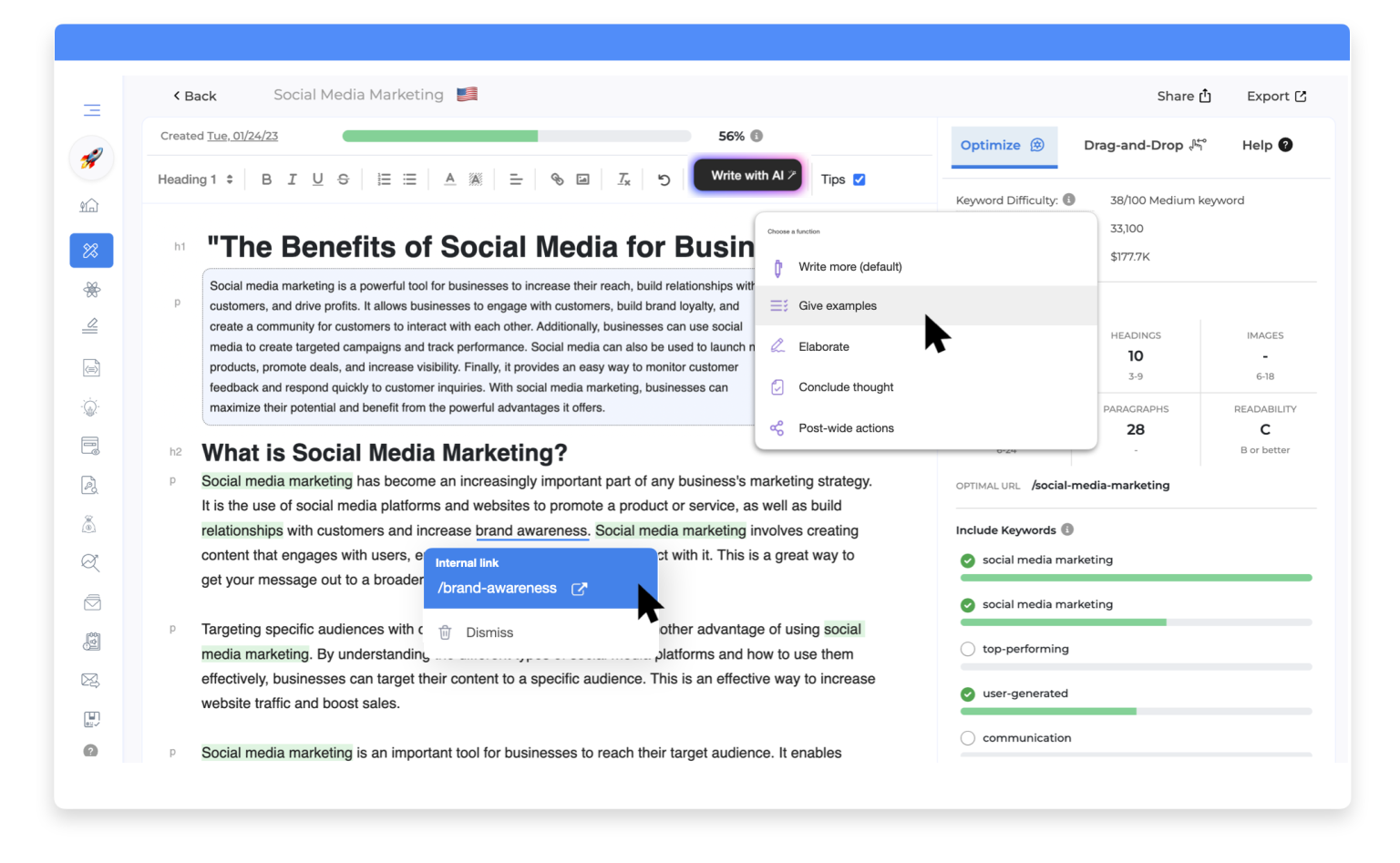
    Wittypen’s free OnPage SEO Checker ranks among the best on-page SEO tools with its superior SEO analysis and usability. At the click of a button, this tool analyzes numerous website parameters, including keywords, content, site structure and speed, and images.

    The tool goes beyond basic keyword optimization and deep dives into technical SEO and code refinement to further boost SERP rankings. It generates in-depth reports on exhaustive SEO parameters to enhance the user experience and improve website performance. This multi-tasking tool offers all the essential features for on page SEO to simplify content optimization and bring your website to the first page of Google.

    Key Features:

    Unique Advantage:

    It combines all the must-have features for efficient on-page SEO management, from comprehensive SEO reports to content improvement and technical SEO.

    2. Google Search Console

    Google Search Console On Page SEO Analysis

    Source

    Google Search Console is among the top on-page SEO tools favored by SEO professionals and website owners alike. It provides automated website performance insights directly from Google that offer actionable tips to improve search rankings.

    Google Search Console displays useful keyword analytics, site performance data, URL analysis, and crawlability reports. Furthermore, it offers user insights that can help you optimize your website for your target audience.

    Key Features:

    • In-depth website performance data, including clicks, views, and impressions for all keywords ranking on Google.
    • Valuable user insights, such as the device used and the location of each unique visitor to your website.
    • Individual analysis of each web page or URL to evaluate performance and detect crawlability and speed issues.
    • Submission of sitemaps or new web pages for indexing.
    • Tracking and troubleshooting of rank changes due to Google algorithm updates.

    Unique Advantage:

    Provides useful user insights directly from Google, along with keyword performance data to help fine-tune content strategies.

    3. Google Lighthouse Audit

    Google Lighthouse On Page SEO tools

    Source

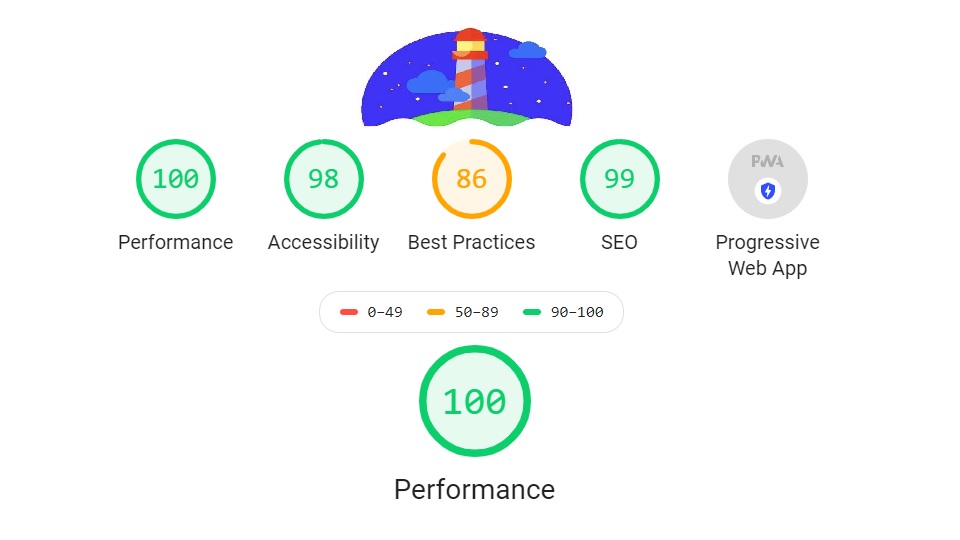
    Google Lighthouse Audit is another free on page analysis tool offered by Google. Lighthouse analyzes a web page based on the following parameters: performance, accessibility, best practices, SEO, and progressive web app optimization. It then generates a Lighthouse report that assigns a score to each parameter, along with tips to improve the score.

    You can run a Lighthouse audit from the Inspect -> Lighthouse (DevTools) option on Google Chrome. Alternatively, you can also install the Lighthouse extension on Chrome for faster access.

    Key Features:

    • Evaluation of various website parameters like First Contentful Paint, Cumulative Layout Shift, and Speed Index, with tips to enhance performance.
    • Ensures that your web page is compliant with technical SEO and website design best practices.
    • While Google Search Console offers keyword insights, Lighthouse focuses on page structure, alt text, links, robots.txt, etc.
    • Creates an Issues panel that lists problems on your web page with recommended solutions that can boost your web rankings.

    Unique Advantage:

    Offers individual scores for various technical website parameters, helping you optimize and monitor webpage performance on the go.

    4. Woorank

    woorank best on page seo tools

    Source

    Woorank offers free and paid on-page SEO tools that audit the sitemap and website structure, along with keyword optimization. It analyzes the page for SEO best practices like meta title length, headers, meta description, and alt tags. It also checks for domain indexing, trust indicators, and traffic.

    The paid versions additionally offer keyword research and website optimization tools for SEO professionals and enterprise clients.

    Key Features:

    • Evaluation of both content and website parameters to improve SEO performance.
    • Free tool for a quick overview of on-page SEO issues with solutions to address the same.
    • Paid options for integrated keyword research and comprehensive website optimization.

    Unique Advantage:

    Generates a Woorank score for your website based on crucial SEO metrics, helping you monitor and optimize website performance.

    5. Moz

    moz on page seo optimization tool

    Source

    Moz ranks among the best on page SEO analysis tools due to its domain analysis capabilities. You can enter your URL in the search bar to view your domain’s authority, top keywords, backlinks, and spam score. The tool also offers an in-depth website audit for detailed analytics.

    Digital marketers can choose between free and premium versions, with the latter providing more extensive website performance data.

    Key Features:

    • Provides a domain authority score and top keywords to help track website performance.
    • Besides on page SEO analytics, it also offers information about backlinks and monitors off-page SEO efforts as well.
    • Contains capabilities for detailed keyword research to fine-tune content and on-page SEO strategies.
    • Moz Pro suggests content improvements and on page SEO optimizations to boost your website rankings and traffic.

    Unique Advantage:

    Provides domain authority score, top-ranking keywords, and backlink information to help you track your website’s performance.

    6. Yoast

    yoast on page seo analysis tools

    Source

    Yoast is among the best on page SEO tools for WordPress users. It is available as a WordPress plugin that performs real-time SEO analysis and optimization of your web content. It recommends essential on page SEO elements like meta tags, alt tags, 301 redirects, internal links, and keyword density.

    The paid version of the Yoast plugin also provides keyword research capabilities.

    Key Features:

    • Real-time page-level optimization of WordPress content for parameters like keyword density, readability, meta descriptions, and linking.
    • Offers automatic Schema in the admin panel of WordPress.
    • Facilitates 301 redirects.
    • Suggests optimized titles and headers.
    • Recommends internal linking opportunities.

    Unique Advantage:

    Real-time on page SEO optimization of WordPress content, combined with advanced keyword research features.

    7. Screaming Frog

    screaming frog seo optimization tool

    Source

    Screaming Frog is among the best on page analysis tools for SEO professionals demanding a deeper insight into technical SEO. Its SEO spider tool crawls your website to find broken links, crawlability issues, and improper redirects. It also performs on page SEO analysis to optimize metadata and titles.

    Website owners often use Screaming Frog for solving crawlability issues, with another tool for on-page SEO and content planning.

    Key Features:

    • Analyzes server log files to detect crawlability issues.
    • Flags broken links, bad redirects, and bad bots, to improve website performance.
    • Offers on page SEO optimization of meta tags, titles, and headers.
    • The free version allows you to crawl up to 500 URLs. The paid version offers unlimited crawls and advanced features.

    Unique Advantage:

    Best-in-class spider simulator that crawls your website to identify hard-to-spot crawlability issues and bad links.

    8. Webconfs

    webconfs on page seo tools

    Source

    Webconfs boasts a wide range of free tools for both on-page and off-page SEO. Its popular features include the keyword density checker, dead link finder, keyword planner, and a spider simulator for site crawling. The simple user interface and plethora of free on page SEO tools can be particularly useful for new website owners.

    Additionally, Webconfs provides off-page SEO tools like a backlink summary and a backlink builder to improve domain authority.

    Key Features:

    • Efficient content optimization facilitated by the keyword planning tool and keyword density checker.
    • Dead link checker to improve search rankings by eliminating broken links.
    • A unified platform that assists with both on-page and off-page SEO.

    Unique Advantage:

    A vast range of free SEO tools to perform SEO analysis and optimizations effortlessly.

    9. SEOCrawl

    seocrawl best on page seo analysis

    Source

    SEOCrawl is another popular on-page SEO tool, famous for its holistic SEO dashboard. This tool simplifies SEO management for businesses and SEO professionals alike. It offers numerous capabilities, such as website rank tracking, SEO monitoring, and crawl stats.

    Moreover, it displays easy-to-implement recommendations for quick and efficient on-page SEO improvements.

    Key Features:

    • Handy tools for SEO management, rank monitoring, SEO reporting, and SEO crawling.
    • In-depth SEO reports with actionable tips to improve website performance.
    • User-friendly SEO dashboard to manage all on-page SEO tasks seamlessly.

    Unique Advantage:

    Intuitive and insightful SEO dashboard for efficient management of all SEO tasks.

    10. GrowthBar

    growthbar content optimization tool

    Source

    GrowthBar is an AI-driven content generation and optimization tool. It allows website owners to produce long-form text from scratch or optimize existing content on their web pages. It offers on page SEO tools to fine-tune word count, keyword density, URLs, and readability.

    Moreover, it also offers keyword suggestions to improve your website’s rankings. GrowthBar is a paid tool with a free trial period. Custom packages are available for website owners, SEO professionals, and digital marketing agencies.

    Key Features:

    • AI-driven technology to produce SEO-optimized long-form content at scale.
    • On page SEO analysis of existing content to improve keyword optimization and readability.
    • Integrated keyword research and suggestion capabilities.

    Unique Advantages

    • Helps churn out SEO-optimized content at a rapid pace for large websites and businesses.

    “Content is what the search engines use to fulfill user intent”

    says Dave Davies, co-founder of Beanstalk Internet Marketing.

    Final Thoughts

    On page SEO tools can propel your website to the first page of Google, giving it the engagement it deserves!

    In today’s competitive and overcrowded digital space, simply building a beautiful website with compelling content is not enough. Optimizing your website for on-page SEO metrics like keyword density, readability, text length, and site speed is non-negotiable for growth.

    On page optimization tools make the job easier by analyzing your website’s performance at the click of a button. Moreover, these tools provide effective guidance to optimize each web page and boost your SERP rankings.

    Armed with monitoring tools and reports/dashboards, leading on page SEO tools help track your SEO efforts and make continuous improvements.

    With versatile tools like Wittypen’s on-page SEO checker, you can create content that rules search engine results and maximizes conversions. Try our efficient and intuitive on-page SEO tool today to open the floodgates of digital success!

  • Stop Scrolling, Start Clicking: How to Create LinkedIn Carousels that Convert

    Stop Scrolling, Start Clicking: How to Create LinkedIn Carousels that Convert

    Source

    If you’ve been active on LinkedIn over the past few years, chances are you’ve come across their nifty carousel posts.

    These posts are part of a document-sharing feature that the professional social networking giant released in 2018 that allows your audiences to view documents without having to leave LinkedIn. They offer immense benefits in terms of engaging your audiences and offering higher Click Through Rates (CTR), making them worth the invested time and resources. 

    If you’re wondering how to create a carousel post on LinkedIn to promote your products and services, we’ve got you covered. In this guide, we will take you through the benefits of using LinkedIn carousels, how to make them, and answer some frequently asked questions. Read on!

    LinkedIn Carousel Post Size and Specifications 

    • Use an upper limit of 255 characters to name and introduce your carousel post. However, it’s recommended that you stick to 150 characters to avoid the text getting cut off on certain devices.
    • The maximum file size for your carousel should be 10 MB. 
    • The maximum image dimensions should be 4320 x 4320 pixels.
    • The file types that LinkedIn accepts include JPG, PNG, and GIFs. 
    • The destination URL should have a “http://” or a https://” prefix. 
    • Carousels that link to a destination URL should stick to a limit of 45 characters.
    • Carousels with a Lead Gen Form CTA must stick to a limit of 30 characters. 

    Sticking to these general guidelines helps you understand how to create a carousel post on LinkedIn and allows your carousel to stand the best chance of optimization for the platform and the various devices it may be viewed on. 

    How to Post a Carousel on LinkedIn?

    Source

    The steps to create and post a LinkedIn carousel post are as follows – 

    Step 1 – Select the subject matter of your carousel and conduct all the necessary research. For example, lets take and example of the following carousel with the topic: 5 ways to use AI in Digital Marketing. Research on the topic and marketing statistics to keep in mind for 2024, finalize which statistics you want to include. Write the copy basis of the research of the primary topic.

    Step 2 – Create graphics that will correspond to each individual slide on your carousel. Draft the content and remember to include an attention-grabbing hook or headline, keep the text short, and not include any links, or they won’t be clickable. 

    Step 3 – Design the visual aspect of your carousel post. The benefit of carousels is that they allow you to design your carousels in your brand’s colors and theme, thereby reinforcing your brand image. Make sure the graphic elements are in sync with the topic being discussed in each slide.

    Image Source

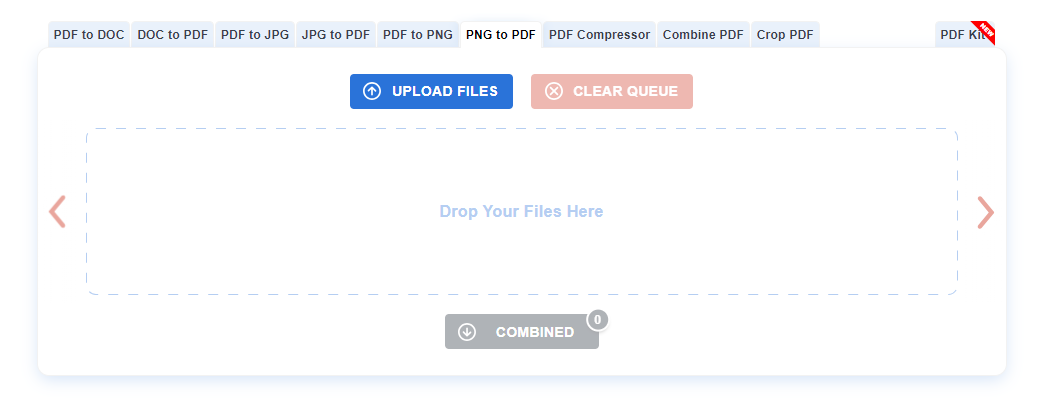
    Step 4 – Once you’re done designing the carousel and adding the content to it, save it as a PDF. You can use PFD converters that are widely available on the internet to convert your graphics to PFD as a document.

    Image Source

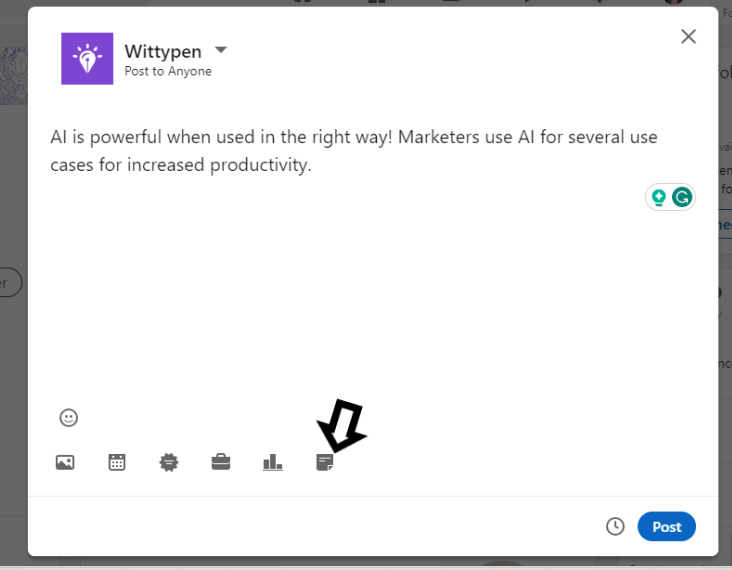
    Step 5 – Open your LinkedIn profile and select Create a Post. Then, tap Add a document and upload the PDF you saved. Add an attention-grabbing headline or a caption, and it’s ready to be posted.  

    Step 6: Make sure to add hashtags that are relevant to the subject that you have chosen to increase the reach of your post

    Best Practices and Use Cases of Carousel Posts on LinkedIn 

    Carousel posts can be used for a variety of purposes on LinkedIn, some of which include – 

    • Sharing infographics 
    • Offering step-by-step instructions for certain processes 
    • Sharing conference slides about events. 
    • Showing relevant listicles with your audiences. 
    • Highlighting career opportunities at your organization. 
    • Compiling customer stories and case studies. 
    • Sharing thought leadership, and more. 

    Additionally, there are certain best practices to keep in mind when using carousel posts on LinkedIn. These include – 

    • Use about 5-6 high-quality images. You can use more, provided they’re highly relevant. 
    • Using images that are 1080 x 1080p allows you to share the same content on other platforms, such as Instagram. 
    • Make the first slide attention-grabbing with a powerful headline or visual. 
    • Aim for a maximum of 10-15 words per slide, which means cutting down on fluff. 

    Check out this example of a carousel posted by Wittypen. The images used are of high quality, with crisp text on each slide. The first slide grabs the reader’s attention, with the forthcoming slides explaining the concept at hand, all of which seamlessly culminate in a CTA. 

    Image Source

    Similarly, Adobe’s creative tips series showcased the power of carousels in presenting step-by-step guides and design features. This strategy not only positioned Adobe as a creative authority but also spurred engagement and discussions within its LinkedIn audience.

    Benefits of Creating Carousel Posts on LinkedIn

    LinkedIn carousel posts offer a host of different benefits in driving user engagement and generating clicks.

    In this section, we take a quick glance at these benefits to show you why you should consider them as a part of your LinkedIn marketing strategy. 

    Increased Engagement

    When compared to regular LinkedIn posts that generally tend to be text-heavy, carousels allow you to add your brand’s logo, contact information, and more. In fact, studies show that the engagement rate for a typical text post was roughly 6.67%. By contrast, the engagement rate of a carousel post was 24.42%. This highlights the remarkable impact of carousels on engagement.

    Great for Storytelling

    Carousel posts give you the opportunity to present a problem and then a solution to it while adding a subtle call to action for your services. Doing so in the form of a story makes your content relatable and more engaging. 

    Improved Brand Image

    Studies reveal that individuals retain 65% more information when it’s paired with relevant visual content. 

    When brands make an effort to create high-quality carousel posts, they strengthen their brand image due to the value they offer their audiences. It not only enhances the visual appeal but also capitalizes on the cognitive advantage of visual content.

    Incredibly versatile

    You can use carousel posts to summarise case studies, present problems and their respective solutions, and even highlight customer testimonials. 

    One of the best examples of a carousel post is this one by HubSpot. You can see how the company has described how MSM scales its sales team in an engaging and visually appealing manner, thereby driving immense engagement. 

    How to Optimize LinkedIn Carousels for Conversions 

    Aside from simply posting carousels, you must optimize them for maximum conversion.

    Here are two things you can do: 

    Make Use of Carousel Analytics

    Carousel analytics offer deeper insights into the performance of your carousels. You can get information such as which slide drew the most attention or led to maximum engagement, where engagement decreased, and so on. These insights can help you tailor your carousels for maximum engagement and conversions in the future. 

    Leverage A/B Testing and Iteration

    A/B testing offers you the benefit of experimenting with different headlines, content lengths, CTAs, and so much more to analyze which characteristics draw the most conversions.

    These results can form the basis of your future carousels. However, remember that checking your analytics must be an ongoing process and not a one-time affair. 

    To Sum It Up 

    Carousel posts on LinkedIn offer businesses a host of different benefits, allowing them to promote their products and services in a visually engaging manner. If done right, they can offer significantly higher engagement than posts in other formats. 

    Thoughtful planning and attention to detail in each card of the carousel can enhance the user experience, encouraging your audience to interact, share, and explore more about your brand.

    Make sure you don’t just create carousel posts for the sake of it; instead, focus on presenting compelling and cohesive narratives that align with your overall marketing strategy. 

  • 10 Content Collaboration Tools to Streamline Your Team Workflow

    10 Content Collaboration Tools to Streamline Your Team Workflow

    With competition in the market being as stiff as it is today, effective collaboration is no longer just a luxury for most businesses; it’s a necessity. This is where team collaboration tools come into the picture, as they allow businesses to streamline their operations and collaborate in real time to yield the best results.

    These tools offer a host of different benefits, and in this guide, we take you through ten of the best tools you can use for your business, no matter the industry you’re a part of.

    We’ll also take you through the key features to look out for when choosing a content collaboration tool so you can make the best decision for your business needs.

    Table of Contents

    1. The Top 10 Content Collaboration Tools in the Market
      1. Wittypen
      2. Document360
      3. Trello
      4. Google Docs
      5. Notion
      6. Coda
      7. ClickUp
      8. ProofHub
      9. DropBox
      10. Confluence
    2. Key Features to Look For in Content Collaboration Tools
    3. Best Practices for Implementing Content Collaboration Tools
    4. FAQs
    5. In Conclusion

    The Top 10 Content Collaboration Tools in the Market

    In this section, we take a look at the 10 best content collaboration tools you can consider for your business.

    1. Wittypen 

    Source

    The first tool on this list is Wittypen. With a seamless content order process, you can offer the team at Wittypen all your requirements (content and SEO) and leave it to the 1000+ expert writers associated with Wittypen to create it for you.

    Powered by the use of various AI tools, such as a Blog Outline Generator, Content Calendar Generator, and more, you can ideate, plan, and create content for your brand in no time. From creating landing pages, blogs, and whitepapers to performing content refreshes, Wittypen can seamlessly take care of all your branding needs.

    All you need to do is select the domain your brand is a part of, the type of content you need, the length of the content, and the package you need, and answer a few questions that help the team understand your requirements. Wittypen then takes care of your requirements from start to finish, delivering content that can significantly help you scale your business.

    2. Document360

    Image Source

    Document360 is an AI-powered knowledge base for customers and teams that you can use to create and share self-service knowledge bases. The platform offers a range of different tools that include documentation creation, editing, categorization, and a whole host of branding features.

    The tool offers a wide range of use cases, including creating a customer knowledge base and an internal knowledge base and outlining standard operating procedures. It offers customers and users a 360 view of all their documentation, making it easier to manage and collaborate with team members in real-time.

    3. Trello

    Image Source

    Trello is among the most well-known project management and collaboration tools that offer a wide range of customizations. The system uses a mix of cards, lists, and boards that make it easy for team members to manage tasks and projects and monitor their progress over time.

    Trello is ideal for a range of different use cases, from project management, onboarding, meetings, task management, and even for brainstorming, making it ideal for both small and large teams alike.

    What’s more, the tool also offers a range of different integrations, making it easy to incorporate it into your existing tech stack.

    4. Google Docs

    Image Source

    Ever since its release back in March 2006, Google Gocs has been the go-to tool for document processing and collaboration, and with a range of updates, it continues to remain the top choice across industries.

    This web-based word-processing software comes with various collaborative features that allow users to share documents with multiple team members while even setting permissions for role-based access.

    Additionally, it allows you to add comments, ask questions, or offer feedback, and also offers version control, so each member works on the latest information at all times. This negates the duplication of effort, saving teams a great deal of time in their day-to-day operations.

    5. Notion

    Image Source

    Notion is among the most popular cloud-based content collaboration platforms that allows users to share a range of content types, from to-do lists, notes, project management workflows, and more.

    It allows users to create, share, and organize their content in real-time while offering a customizable interface that allows for all workflows to be managed from a centralized location.

    Additionally, users can filter and sort tasks based on urgency, allowing for better time management while also offering them the ability to label, tag, and sort tasks to ensure greater overall organization.

    6. Coda

    Image Source

    Coda is an all-in-one collaborative workspace that allows teams to organize all their tasks and projects, allowing for greater efficiency. Users can create, organize, and automate a wide range of tasks, thereby saving precious time that they can dedicate to crucial operations.

    Coda uses hubs to allow teams to collaborate on projects while also being able to track progress, changes, and more with centralized version control, thereby eliminating any duplication of work.

    One of the key highlights of this platform is its commitment to secure content collaboration, with granular permissions for individual users and features like two-factor authentication that ensure the highest standards of data protection at all times.

    7. ClickUp

    Image Source

    ClickUp is a project management tool that allows teams of all sizes to collaborate in real time, thereby allowing them to maximize productivity. ClickUp uses a host of different tools that allow teams to manage various tasks. These include Docs, Whoteboards, Dashboards, and Goals, among several others.

    The tool is ideal for teams across industries, from engineering to design and even marketing and software development. The tool offers a unique feature that allows you to view your work as you choose, be it in the form of lists, boards, or calendars.

    This results in granular levels of customizability, making ClickUp a versatile option for a host of different niches.

    What’s more, ClickUp is ideal for a range of different use cases, from project management to organizing remote work and even using it as a CRM to manage all your client’s information in one place.

    8. ProofHub

    Image Source

    ProofHub is yet another cloud-based team collaboration and project management platform that offers unique in-built file management software. This allows teams to create, upload, and organize files in one seamless interface, allowing for improved real-time collaboration, even within large teams.

    The tool also allows users to attach documents to tasks, chats, and discussions, allowing for greater access to all the relevant information when needed. It also offers seamless integration with Google Drive, allowing you to access the benefits of its whole suite of tools, from Google Docs and Sheets, among several others.

    9. DropBox

    Image Source

    DropBox is one of the most popular cloud storage tools that allows individual users and teams to access all their files in one place. With a desktop and mobile app, it offers easy access from a wide range of devices, allowing users to access from anywhere, seamlessly enabling remote work.

    DropBox uses shared links that you can use to share files both within and outside of your organization. You can also use it to gather feedback and invite members to edit files collaboratively.

    One of its biggest USPs is that it can be integrated with over 100,000 third-party apps, making it ideal for organizations across all industries and scales.

    10. Confluence

    Image Source

    Confluence offers teams a unified interface that allows them to create, share, and edit files in real-time seamlessly. Users can easily access and organise company information that allows companies to allow their customers to access key information themselves.

    Confluence allows teams to store content across a range of formats, including PDFs, images, documents, and more while allowing easy synchronization to Jira that allows for projects and tasks to be easily created, managed, and cleared.

    One of the key highlights is that team members can also leave feedback on documents in various ways, making it one of the best platforms for collaboration.

    Key Features to Look For in Content Collaboration Tools

    In this section, we take a look at five things you must look for when choosing content collaboration software. These include –

    • Real-time collaboration and editing – The ability to collaborate and edit documents in real time is one of the biggest advantages of a cloud-based collaboration tool and a must-have.
    • Version control and document management – Version control allows each user to track all the changes made to a document, along with who, when, and why, thereby ensuring each user works off the latest version of the data.
    • Task management and workflow automation – Effective task management makes it easier for large teams to organize tasks and projects based on urgency, thereby ensuring seamless workflows.
    • Communication and messaging capabilities – The right tool must allow team members to be able to communicate in real-time, thereby ensuring seamless collaboration.
    • Integration with other tools and platforms – A wider scope for integration means you can seamlessly introduce a tool into your existing tech stack.

    Best Practices for Implementing Content Collaboration Tools

    Some of the best practices to keep in mind when using a content collaboration tool include –

    • Assemble all the relevant stakeholders from each team to learn and understand how to use the tool and make use of its features.
    • Make use of clear briefs to help streamline processes and ensure seamless division of labor.
    • Ensure the use of project management best practices. Appoint a project lead to help streamline all the facets of the project to ensure timely delivery.
    • Make use of organizational features to break up projects into smaller, more achievable targets.
    • Allow time for each user to learn and understand how the tool works and incorporate feedback wherever necessary.

    In Conclusion

    As you can see, there are a host of content collaboration tools available in the market today, each of which offers its benefits. From shared workspaces to version control, each of them is designed for seamless collaboration for teams of all sizes.

    However, if you’re looking for a platform that offers content that’s tailored to your business’s needs while allowing all relevant stakeholders the ability to access the content, provide feedback, and more, Wittypen is your top choice. Powered by a host of AI tools, this platform is ideal for businesses looking to scale their content needs while driving revenue.

    Schedule a call to find out how Wittypen can seamlessly manage all your content needs and ensure your business’s growth in a competitive marketplace.